Building a Lean, Declarative NixOS for My GPD Micro PC
Why I built a NixOS configuration around the GPD Micro PC instead of installing a full Linux distribution or following the latest desktop hype.
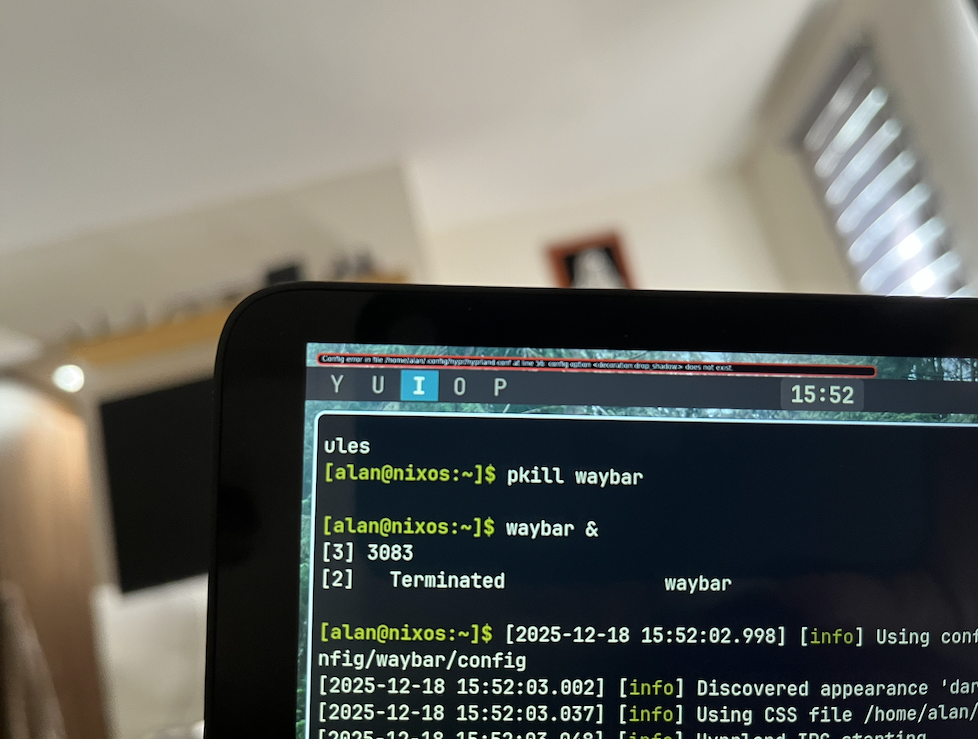
The GPD Micro PC is a strange and useful little machine: a six-inch computer with a portrait display, a thumb keyboard, and enough ports to be a real companion rather than a novelty. It deserves an operating system that acknowledges those constraints instead of treating it like a conventional laptop with a smaller screen.
That is why I built gpd-nixos, my NixOS configuration for this device. It describes the system, the Hyprland session, and the dotfiles in one repository. The goal was simple: make the machine predictable, compact, and easy to recover when I want to change it.
Built for the hardware, not despite it
The configuration starts with the things that make the GPD Micro PC unusual. Its internal panel is a 720×1280 portrait display, so Hyprland rotates and scales it at the compositor level. Keeping scaling in one place avoids the familiar Linux problem of one application being huge, another tiny, and a third somehow both.
There are other small but important decisions:
- Text-mode GRUB avoids the graphical boot menu issues on the portrait panel.
- Kernel parameters tune the Gemini Lake Intel GPU for stability and use the appropriate VA-API driver.
- A quiet boot and a large Terminus console font make the TTY readable on a six-inch screen.
- The cramped keyboard gets dual-function keys:
/becomes Alt when held,\becomes Super, and the down arrow becomes Ctrl. - Workspaces move from the awkward number row to
Y U I O P, close to the home row. - The function row controls brightness, volume, and media through the hardware keys the device already exposes.
These are not generic desktop preferences. They are the small adjustments that make a pocket-sized computer comfortable enough to use for coding, remote work, and actual daily tasks.
A small system with a complete working environment
The stack is intentionally modest: Hyprland and XWayland, greetd with tuigreet, Waybar, Rofi, Alacritty, PCManFM, PipeWire, Docker, and Doom Emacs. The look is Gruvbox Dark across the TTY, terminal, and status bar.
The configuration also manages the user environment without adding another management layer. A NixOS activation script links the versioned dotfiles into ~/.config, while deliberately leaving real files and directories alone. That means the repository is the source of truth, but rebuilding the system does not blindly destroy local work.
The result is not a minimal system for its own sake. It is a small surface area I can understand and control. Every installed package, service, keybinding, and piece of desktop behavior has a place to live in the configuration.
Why start from scratch instead of installing a full Linux distribution?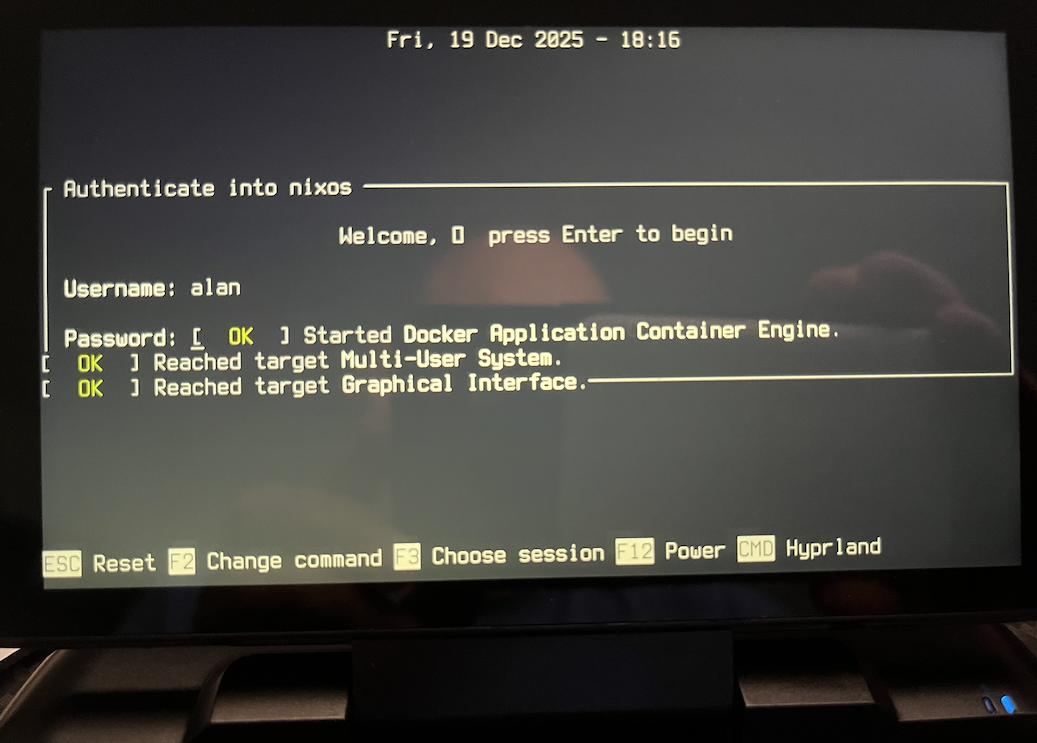
A full desktop distribution is often the right answer, especially when the goal is to get productive immediately. But it also arrives with many choices already made: desktop services, applications, themes, background processes, package history, and configuration conventions that may never fit a tiny handheld computer.
For this machine, I wanted the opposite starting point. I wanted to choose the compositor, terminal, audio stack, file manager, login flow, editor, and services with the device in mind. Beginning lean makes every addition intentional. It is easier to notice what consumes resources, what conflicts with the display, and what simply does not earn its place.
The practical advantage is control. The philosophical advantage is clarity: the system is not a collection of tweaks accumulated over months. It is an explicit description of what I want the machine to be.
Why NixOS
NixOS makes that description operational. The configuration is declarative, so a rebuild can reproduce the same system state instead of relying on a memory of installation steps. When I change something, I can test a configuration without making it the default, switch to a new generation when it is ready, and roll back if it is not.
That changes upgrades too. Updating does not have to mean hoping that years of imperative changes still fit together. The configuration and dotfiles live in Git; the system can be rebuilt from them, and NixOS keeps generations available for recovery. Automatic garbage collection and store optimization help keep the small machine from carrying unnecessary baggage forever.
It is not magic, and it does not remove the need to understand Linux. It gives that understanding a durable form: a repository that can be reviewed, changed, rebuilt, and restored.
Why I did not use Omarchy or follow the hype
I understand the appeal of opinionated desktop projects such as Omarchy. They package a coherent visual language, a workflow, and a lot of decisions into a fast path to a polished Linux environment. I have also collaborated with Omakub, so I appreciate the work that goes into making a desktop setup approachable.
But this project was not looking for a complete desktop identity. The GPD Micro PC is a specific piece of hardware with specific compromises, and I wanted to learn and own the stack all the way down. Rather than adopting the latest preset and adapting around it, I chose to create a Linux environment from the ground up with NixOS: smaller, declarative, and shaped by the way I actually use this device.
That path is slower at the beginning. In return, it gives me a configuration I can explain, reconstruct, and evolve without waiting for a trend or a distribution to choose the next direction for me.
Try it on your own GPD Micro PC
The full configuration is available at github.com/alanmaciel/gpd-nixos. It includes the system configuration, Hyprland and Waybar setup, keyboard behavior, dotfiles, and installation notes.
If you have a GPD Micro PC, feel free to use it as a starting point. Regenerate the hardware configuration for your own disk layout, review the settings, and make it yours. That is the best part of a declarative setup: you do not have to inherit someone else’s machine. You can begin with a working map and keep drawing your own.